What Capacity Really Changes
The capacity of your microSD card decides one thing only: how much room you have for game files, save data and screenshots. It has no effect on performance. The R36 Max runs on a quad-core Rockchip RK3326 processor at up to 1.5 GHz with 1GB of RAM, and those two components are what determine how smoothly an emulator runs. A 128GB card will not make a PS1 game run faster than a 64GB card. It will not make a demanding N64 or PSP title play better either, since that depends mostly on the specific game and your settings. Going with 128GB means buying storage, not power.
The real question is which systems you plan to emulate. 8-bit and 16-bit games, along with many arcade classics, come in very small files. PS1 games take up much more space because they are disc images. So the same card can feel enormous for a library of cartridge-era games and fill up quickly with a disc-based collection. No exact game count can be promised: it all depends on what you put on the card.
Why Usable Space Is Less Than the Number on the Card
A card sold as 64GB never shows 64GB free once it is inserted. The first reason is the unit of measurement: manufacturers count in billions of bytes, while most operating systems and computers report size in binary units. By straight conversion, 64 billion bytes comes to about 59.6 GiB, and 128 billion bytes to about 119.2 GiB. The second reason is formatting: the file table and partitions take up part of the card too. Finally, on a card that holds the operating system, the system claims its share before a single game is added.
This is not a defect or a trick. It is simply how every memory card works. To plan your library, leave yourself some headroom: start from the space actually shown after inserting the card, keep a few gigabytes free for save data, and do not try to fill the card to the last byte. A card that is completely full is harder to manage and makes backups more of a hassle.
| Capacity | Best for | Good to know |
|---|---|---|
| 64GB | 8-bit and 16-bit systems, arcade, a curated game selection | About 59.6 GiB by conversion, slightly less after formatting |
| 128GB | Large library, lots of PS1 games | About 119.2 GiB by conversion, availability being confirmed |
| Spare system card | Backup copy of the system or trying a community firmware | Well-known brand, UHS-I U1 or U3, A1 is enough |
| Second games card | Splitting collections or expanding your library | Up to 128GB, documented limit |
| Over 128GB | Not recommended for any use | Beyond the documented limit, recognition not guaranteed |
Two Slots, Two Jobs: TF1 and TF2
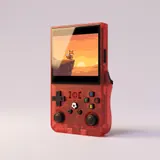
The R36 Max has two microSD slots, and they do different jobs. The TF1 slot, on the right side, holds the system card: it contains the console's Linux operating system and its EmulationStation-style menu. The TF2 slot, on the left side, holds the games card. This split is handy because you can expand or reorganize your library on TF2 without touching the system. It also comes with two simple rules: never remove the TF1 card while the console is on, and never format it by mistake on a computer thinking you are wiping a games card.
The system card deserves extra care, because the console will not boot without it. Units ship with a factory Linux image, sometimes ArkOS depending on the batch. If that card gets damaged, corrupted or lost, you need a way to rebuild it. That is the main reason to keep a spare card: to have a ready-to-use copy of the system, or to try a community firmware without erasing the original card.
Which microSD Card to Buy as a Backup or Add-On
For a spare card or a second games card, go for reliability over the lowest price. A well-known brand bought from a retailer you can identify reduces the risk of counterfeits: some no-name cards claim a capacity they do not actually have and lose data once they fill up. For speed, a UHS-I card rated U1 or U3 works well, and an A1 rating is enough for this use. There is no need to pay extra for higher speed classes on a console like this one.
For capacity, stay within the documented limit: the R36 Max supports cards up to 128GB. A larger card goes beyond what is specified for this model, and there is no guarantee it will be recognized. For a backup system card, reliability matters more than size. For a games card, choose based on how big your library is, keeping the headroom mentioned above.
Back Up Both Cards Before Changing Anything
Before you replace a card, move up to a larger capacity or install a community firmware, such as a version of ArkOS built for the R36 Max, back up both cards. For the TF2 games card, copying its entire contents into a folder on your computer is usually enough, save data included. For the TF1 system card, a simple file copy is not enough: create a full image of the card with disk imaging software, so you can write it back exactly as it was if something goes wrong.
This step takes a little time and saves you from nasty surprises. Changing firmware is done at your own risk, and a system card wiped without a backup leaves the console with no operating system until a new image is prepared. If you can, keep your backups in two places, and label each card with its role so you never mix them up.
- Turn off the console before removing a card.
- Copy the entire contents of the TF2 card to your computer.
- Create a full image of the TF1 card.
- Check that your backups open before changing anything.
- Label the cards: system on the right, games on the left.
64GB or 128GB: Which Capacity Fits How You Play
The 64GB card is a good fit if you mostly play 8-bit and 16-bit systems and arcade classics, which use small files. It is also enough if you prefer a curated selection over a complete library, or if you plan to add your own games card later. The 128GB card is better suited to players who want lots of PS1 games, since disc images are large, or who want to try N64 and PSP titles, keeping in mind that how smoothly they run depends on the game and settings. It is also the easygoing choice if you would rather not sort through your library.
Either way, only play games you own the rights to. The R36 Max sold here is the original model with a 4-inch square screen at 720 × 720 pixels. The 64GB option is listed by the supplier, and availability of the 128GB option is still being confirmed: we will let you know before any order is placed. Otherwise, a 64GB card paired with a second brand-name card is a simple solution.
Frequently asked questions
Can I swap the TF1 and TF2 cards?
No, keep each card in its own slot. The console looks for its system on the card in TF1, on the right side. If you put the games card there, it will not find its system. After removing both cards, go by the label you added, or check their contents on a computer before putting them back.
How can I spot a counterfeit microSD card?
Be wary of a price far below the going rate, packaging with no brand, or a seller you cannot identify. Once the card arrives, a capacity testing tool can write to and read back the entire card to confirm it really offers the advertised space. Run this check before copying your games or your system image onto it.
What should I do if the system card won't boot anymore?
Turn off the console, remove the TF1 card and write the full image you backed up back onto it using disk imaging software. Without a backup, you will need to prepare a new system image, which is done at your own risk. That is exactly why it pays to keep a spare card ready to go, stored safely alongside your console.
Sources
Our guides are based on the supplier's product sheets and public documentation. We don't claim any hands-on testing.